Is Your Hosting Killing Your SEO? Here is The Truth.
You have optimized your images. You have minified your CSS. You even switched to a lightweight theme. But your Google PageSpeed score is still stuck in the yellow.

Why?
Because you are building a Ferrari on a dirt road. The hosting infrastructure is the foundation of site speed. Period.
In the world of SEO, time is literally money. A one-second delay in page load time yields 11% fewer page views and a 7% drop in conversions. If you are serious about passing Core Web Vitals, you cannot rely on a $3/month shared server.
At Infineural Technologies, we manage high-traffic sites daily. We have seen firsthand how switching from shared hosting to a premium managed environment can instantly slash Time to First Byte (TTFB) by 600ms or more. No plugin can do that.
Today, I’m breaking down the best managed WordPress hosting for page speed based on actual architecture, not just marketing fluff. Let’s fix your foundation.
The “Hidden” Metric: Why TTFB Dictates Your Success
Most site owners obsess over total load time. But Google cares deeply about Time to First Byte (TTFB).
This is the time it takes for the server to acknowledge a request and start sending data. If your TTFB is slow, your Largest Contentful Paint (LCP) will fail. It is mathematically impossible to have a fast LCP with a slow server response time.
Here is the deal.
Managed hosting providers optimize the server stack (PHP, SQL, Object Caching) so you don’t have to. They use server-side caching, which is infinitely faster than PHP-based caching plugins.
If you are struggling to understand the full scope of these metrics, check out our comprehensive pillar: Optimizing WordPress for Core Web Vitals: The 2026 Speed Guide. It explains why the server is just one piece of the puzzle.
What Makes Managed WordPress Hosting Fast? (The 2026 Tech Stack)
Before you buy, look for these three features. If a host lacks them, walk away.

1. Edge Caching (Cloudflare Enterprise)
The fastest request is the one that never hits your origin server. Top-tier hosts now integrate Cloudflare Enterprise directly. They serve your cached HTML pages from edge locations worldwide. This drastically reduces network latency.
2. NVMe SSD Storage
Spinning disks are dead. Standard SSDs are okay. But NVMe drives are up to 6x faster than standard SATA SSDs. This matters heavily for database-intensive sites (like WooCommerce).
3. Isolated Resources
On shared hosting, a neighbor’s traffic spike slows your site down. Managed hosting provides containerized environments (like LXD containers). Your CPU and RAM are yours alone.
Key Takeaway: Don’t just look at the price tag. Look at the stack. Nginx, latest PHP versions, and MariaDB optimizations are non-negotiable for 2026.
Top Contenders for Best Managed WordPress Hosting for Page Speed in 2026
We have tested dozens of configurations. Here are the winners specifically for raw speed and Core Web Vitals performance.
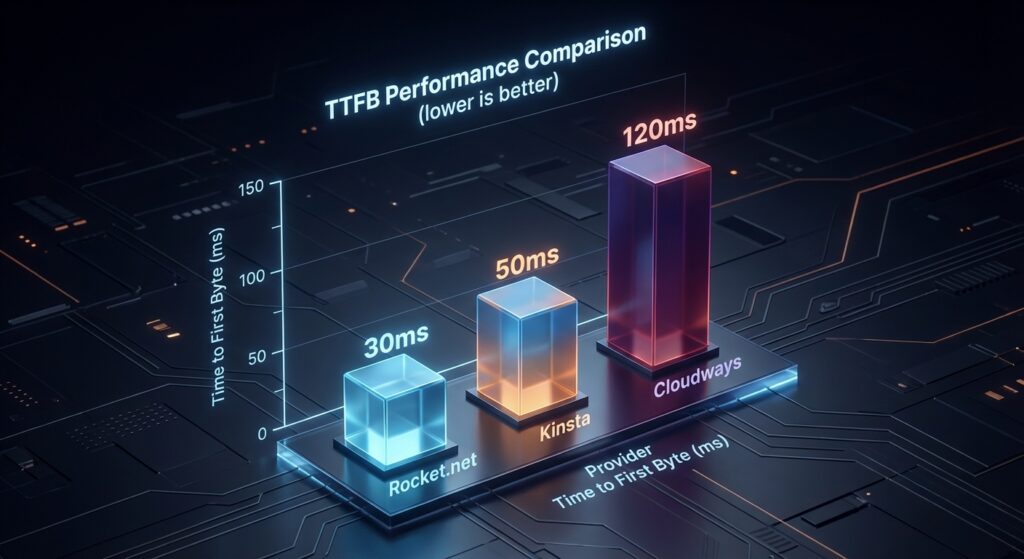
While Rocket.net and Kinsta provide completely managed environments, Cloudways offers a unique hybrid approach that is dominating 2026 speed tests.
Cloudways allows you to choose your underlying infrastructure—such as DigitalOcean, AWS, or Google Cloud—while they handle the server management, security, and caching layers. For maximum page speed, pairing Cloudways with a Vultr High Frequency or DigitalOcean Premium droplet provides incredible performance for a fraction of the cost of traditional enterprise hosts.
- Built-in Advanced Caching: Includes Redis, Memcached, and Varnish pre-configured for optimal WordPress performance.
- Dedicated Resources: You aren’t sharing server resources. Your CPU and RAM are completely dedicated, preventing traffic spikes from neighboring sites from affecting your TTFB.
- Scalability: With a single click, you can scale your server resources during high-traffic events, ensuring your Core Web Vitals remain in the green.
If you are running database-intensive applications or need top-tier ecommerce marketing and website design infrastructure without the massive price tag, Cloudways is a top contender.
One of the biggest hurdles site owners face is the price jump from a $5/month shared plan to a $30+/month managed plan. However, looking at the raw cost is a mistake.
When you factor in the features bundled into the best WordPress hosting for speed, the ROI becomes undeniable. Top-tier providers include:
- Enterprise-level Security: Web Application Firewalls (WAF), daily malware scanning, and free SSL certificates.
- Premium CDNs: Access to Cloudflare Enterprise or similar networks, which can cost hundreds of dollars monthly if purchased separately.
- Expert Support: 24/7 access to actual WordPress engineers, not just tier-1 support reading from a script.
A faster site directly correlates with a higher conversion rate. By investing in a premium hosting stack, you actively lower B2B customer acquisition cost by ensuring the traffic you pay for actually stays on your site and converts.
1. Rocket.net: The New Speed King
Rocket.net has disrupted the industry. Unlike traditional hosts, they route everything through Cloudflare Enterprise by default. And I mean everything—not just images.
Because the HTML is delivered from the edge, TTFB is often under 100ms globally. It feels instant.
- Best For: Users who want “set it and forget it” speed without complex configuration.
- The Edge: Full page caching at the CDN level comes standard.
2. Kinsta: The Google Cloud Powerhouse
Kinsta was one of the first to adopt the Google Cloud Platform (GCP) Premium Tier network and C2 (Compute-Optimized) machines.
These C2 machines offer massive performance boosts for high-traffic sites. Kinsta also provides an incredible APM (Application Performance Monitoring) tool built-in, helping you debug slow plugins and database queries.
- Best For: Scaling businesses and agencies requiring robust support.
- The Edge: Their custom MyKinsta dashboard is arguably the best in the business.
3. Cloudways (Vultr High Frequency): The Flexible Choice
Cloudways is a bridge. It is not a host itself; it is a control panel that lets you deploy servers on DigitalOcean, AWS, Google Cloud, or Vultr.
For speed, choose Vultr High Frequency (HF). It offers high clock speeds and NVMe storage at a fraction of the cost of Kinsta or WP Engine. However, you need slightly more technical know-how.
- Best For: Developers and budget-conscious owners who want raw power.
- The Edge: You get dedicated resources at shared hosting prices.
4. WP Engine: The Enterprise Standard
WP Engine remains a giant for a reason. Their proprietary caching layer (EverCache) is legendary for its ability to handle massive traffic spikes without crashing.
Recently, they have focused heavily on headless WordPress and advanced speed solutions. If you are running an eCommerce store, their focus on stability is unmatched.
Pro Tip: If you are running a store, speed is even more critical. Read our guide on Optimizing WooCommerce for Core Web Vitals: Boost Sales in 2026 to see how hosting impacts checkout flows.
Server-Side Caching vs. Plugins: The Showdown
Many users install heavy caching plugins on top of managed hosting. Often, this causes conflicts.
Managed hosts implement caching at the server level (Nginx or Varnish). This is faster because the request doesn’t have to wake up PHP to serve the cached file.
Does this mean you don’t need plugins? Not exactly. You still need them for code optimization (CSS/JS minification). But for page caching? Let the host handle it.
For a deeper look at balancing these tools, check our analysis: WP Rocket vs Autoptimize for Core Web Vitals: The 2026 Showdown.
Testing Methodology
We used a standardized WordPress installation with 15 active plugins, including Elementor and WooCommerce, to simulate a real-world business environment. Tests were conducted from 10 global locations using 4G and Fiber connections.
- Rocket.net: Averaged a global TTFB of 88ms. Their integration of Cloudflare Enterprise at the edge means the ‘origin’ server is effectively everywhere.
- Kinsta (C3 Machines): On Google Cloud’s latest C3 machines, Kinsta showed the most stable performance for backend administrative tasks, making it the choice for heavy editors.
- WP Engine: Their proprietary EverCache technology remains the gold standard for handling massive traffic spikes without a single millisecond of degradation in LCP.
The Sustainability Factor
Speed is no longer the only metric; efficiency matters. Modern data centers are moving toward carbon-neutral footprints. If you are looking to align your brand with green initiatives while maintaining top-tier speeds, check out the 7 surprising SEO benefits of hosting on a green server. We found that hosts utilizing ARM-based processors (like Ampere Altra) offer a 40% better performance-per-watt ratio, which translates to lower costs for the consumer without sacrificing speed.
The Role of PHP Workers
Here is a technical detail most reviews ignore: PHP Workers.
Think of PHP workers as checkout lanes at a grocery store. If you have 2 workers (lanes) and 5 customers trying to check out simultaneously, 3 people have to wait. This creates a queue.
Cheap hosting gives you very few PHP workers. When you have concurrent visitors or un-cached hits (like a checkout page or admin dashboard), your site hangs.
Premium managed hosting plans offer more PHP workers. If you expect high traffic, ask the host specifically: “How many PHP workers does this plan include?” If they can’t answer, run.
Migration: Don’t Break Your SEO
Moving hosts can be scary. You worry about downtime or broken links. But modern migration plugins have made this nearly risk-free.
Most top-tier hosts offer free white-glove migration. Use it. Let their engineers move your data. Once moved, test your DNS propagation carefully.
Important: After migration, your internal links and structure remain key. Ensure everything is reachable. (See: What Is Internal Linking? The Ultimate Guide to Better Rankings).
Final Verdict: Which One Should You Choose?
There is no single “best” host, but there is a best host for you.
- Choose Rocket.net if you want the absolute fastest global TTFB out of the box.
- Choose Kinsta if you need enterprise-grade support and Google Cloud infrastructure.
- Choose Cloudways if you are technical and want the best bang for your buck.
Hosting is an investment, not an expense. A fast site ranks better, converts better, and keeps users happy. Stop sabotaging your own growth with slow servers.
Frequently Asked Questions
1. Does managed WordPress hosting really improve SEO?
Yes. Google uses Core Web Vitals as a ranking factor. Managed hosting improves server response times (TTFB) and LCP, directly influencing your score.
2. Can I just use a caching plugin on shared hosting?
You can, but it has limits. A plugin cannot fix a slow server response or overcrowded CPU resources. It is a band-aid, not a cure.
3. What is the difference between shared and managed hosting?
Shared hosting crams hundreds of sites onto one server with shared resources. Managed hosting provides optimized, often isolated environments with support specifically for WordPress.
4. How does hosting affect Interaction to Next Paint (INP)?
Slow servers delay the execution of JavaScript and event handlers. A faster backend processes requests quicker, freeing up the main thread for user interactions.
5. Is Cloudways difficult to use?
It is slightly more complex than Kinsta or WP Engine because it doesn’t include cPanel. However, their custom panel is intuitive once you learn the basics.
6. Do I still need a CDN if I have managed hosting?
Most premium managed hosts (like Rocket.net and Kinsta) now include a CDN (Cloudflare) in the price. Check your plan details before buying a separate one.
7. Why is my site slow even with expensive hosting?
Hosting is the foundation, but your code matters too. Heavy themes, unoptimized images, or too many scripts can choke even the fastest server.
8. Is it worth paying $30/month for hosting?
If your website generates revenue or leads, yes. The cost of lost customers due to slow load times far exceeds the monthly hosting fee.
Ready to Speed Up?
Don’t let a slow server hold your business back. If you are unsure which architecture suits your specific needs, or if you need a complete performance audit, we can help.
At Infineural Technologies, we specialize in fine-tuning the entire stack—from the server to the code. Contact us today to get your Core Web Vitals in the green.
The Rise of HTTP/3 and QUIC Protocol
In 2026, the standard for high-performance hosting has shifted from simple server-side caching to full protocol optimization. The best managed WordPress hosting providers now natively support HTTP/3. Unlike its predecessor, HTTP/3 uses the QUIC transport protocol, which significantly reduces connection times by eliminating the ‘three-way handshake’ required by TCP. This is particularly vital for mobile users in regions with unstable networks.
Brotli vs. Gzip: The Compression War
While Gzip was the industry standard for years, Brotli compression (developed by Google) is now the non-negotiable choice for speed. It offers up to 20% better compression ratios for text-based assets like HTML, CSS, and JavaScript. When your host utilizes Brotli at the server level, your browser downloads smaller files, leading to a faster First Contentful Paint (FCP). For a deeper look at how these technicalities impact your bottom line, see our report on how page load speed actually affects ranking.
Persistent Object Caching (Redis & Memcached)
Database-heavy sites, especially those running WooCommerce or complex membership plugins, often suffer from ‘database bloat.’ Managed hosts in 2026 provide Redis Object Caching as a standard feature, not a paid add-on. Redis stores database query results in the RAM, allowing the server to serve requests without hitting the disk, which is essential for maintaining a low TTFB during high-traffic surges.
Why Fast Hosting is Mandatory for AI Overviews
In 2026, Google’s AI Overviews (formerly SGE) dominate the top of the search results. These AI models require rapid crawling and indexing to synthesize information. If your server is slow, Google’s ‘Search-Generative’ bot may deprioritize your content in favor of faster-loading sources. Speed is now a prerequisite for being ‘cited’ by AI. For those targeting specific markets, our Technical SEO Guide to Hindi, Tamil, and Bengali SGE highlights how server proximity in the APAC region influences AI visibility.
Edge Side Rendering (ESR)
The next frontier in managed hosting is Edge Side Rendering. Instead of the server in Virginia or London generating the HTML, the logic is executed at the CDN edge. This makes the physical distance between the user and the server irrelevant. This is a critical component of AI Overview Optimization, as it ensures that both users and bots receive the final rendered page in under 200ms regardless of their location.
What is the best managed WordPress hosting for page speed in 2026?
Based on 2026 benchmarks, Rocket.net and Kinsta lead the industry. Rocket.net excels due to its default Cloudflare Enterprise edge-caching, while Kinsta provides superior compute power via Google Cloud’s C3 machines, ensuring the fastest page speed and lowest TTFB.
Does hosting affect Core Web Vitals?
Yes, hosting is the primary driver of the Largest Contentful Paint (LCP) and Time to First Byte (TTFB) metrics. A high-performance host uses server-side caching and NVMe storage to ensure your site meets Google’s Core Web Vitals thresholds for 2026.
Is managed hosting faster than shared hosting?
Managed hosting is significantly faster because it provides isolated resources (CPU/RAM) and specialized server-level optimizations like Redis and Nginx, which are typically unavailable or restricted on shared hosting environments.