Learn how to deploy and configure self-hosted n8n AI agents in 2026. Stop overpaying for Zapier and build autonomous, code-backed workflows today.
Why Indian startups ditch Zapier for self-hosted n8n in 2026
In 2026, the cost of running cloud-hosted automation has forced a major migration. Indian startups are scaling rapidly, but scaling on traditional Software as a Service (SaaS) platforms like Zapier introduces severe margin compression. According to data from the India SaaS Report 2025 by Bain & Company, rising API and execution costs represent up to 25% of operational budgets for heavily automated businesses. Self-hosting n8n on a Virtual Private Server (VPS) offers a clear path to capital efficiency. It allows companies to run unlimited executions for a fixed monthly server fee of roughly ₹800 to ₹1,500. This shift is not a minor adjustment; it is a fundamental restructuring of business operations that enables true AI-powered growth.

By moving your workflows to self-hosted instances, your business achieves complete data sovereignty. You no longer route sensitive customer data through third-party servers with opaque security policies. Instead, you run your operations within your own secure perimeter, laying the foundation for zero excuses execution. This setup is particularly critical when managing complex, high-frequency tasks. If you run multiple campaigns across several platforms, execution costs on commercial SaaS can kill your profitability. Our work with growing Small and Medium Businesses (SMBs) in India shows that migrating these workflows to self-hosted n8n instances reduces operational software costs by up to 92% in the first quarter alone. This is how we deliver zero-waste PPC and high-yield tech solutions under one roof.
For teams running high-volume marketing outreach, this cost reduction directly translates to increased marketing budgets. Instead of paying for API execution overhead, you can reallocate capital to active campaigns. This financial optimization is the first step toward building a sustainable growth model. By building on self-hosted infrastructure, you gain complete control over your technical stack. You can write custom code, connect to local databases, and scale your server resources as your volume increases. This level of flexibility is simply impossible within the rigid constraints of traditional, closed-source automation platforms.
The architecture of a production-grade n8n AI agent
We must distinguish between linear workflows and autonomous agents. A linear workflow runs from trigger to action in a deterministic sequence. An autonomous agent uses an iterative feedback loop where the model receives a goal, selects an appropriate tool, evaluates the output, and decides the next step. In n8n, this is achieved through the Tools Agent node, which implements the LangChain framework under the hood. Building these systems under one roof allows businesses to coordinate complex multi-channel campaigns with minimal human intervention.
When designing systems for agentic AI for marketing, companies must transition from static linear rules to dynamic decision loops. In our work at Infineural, we have observed that traditional linear structures fail when dealing with unstructured customer inputs. An agent, however, can interpret user intent and dynamically select the correct database or email tool to resolve the query. This prevents the system from breaking when users ask questions outside the expected format. It provides a reliable technical foundation for customer-facing systems.
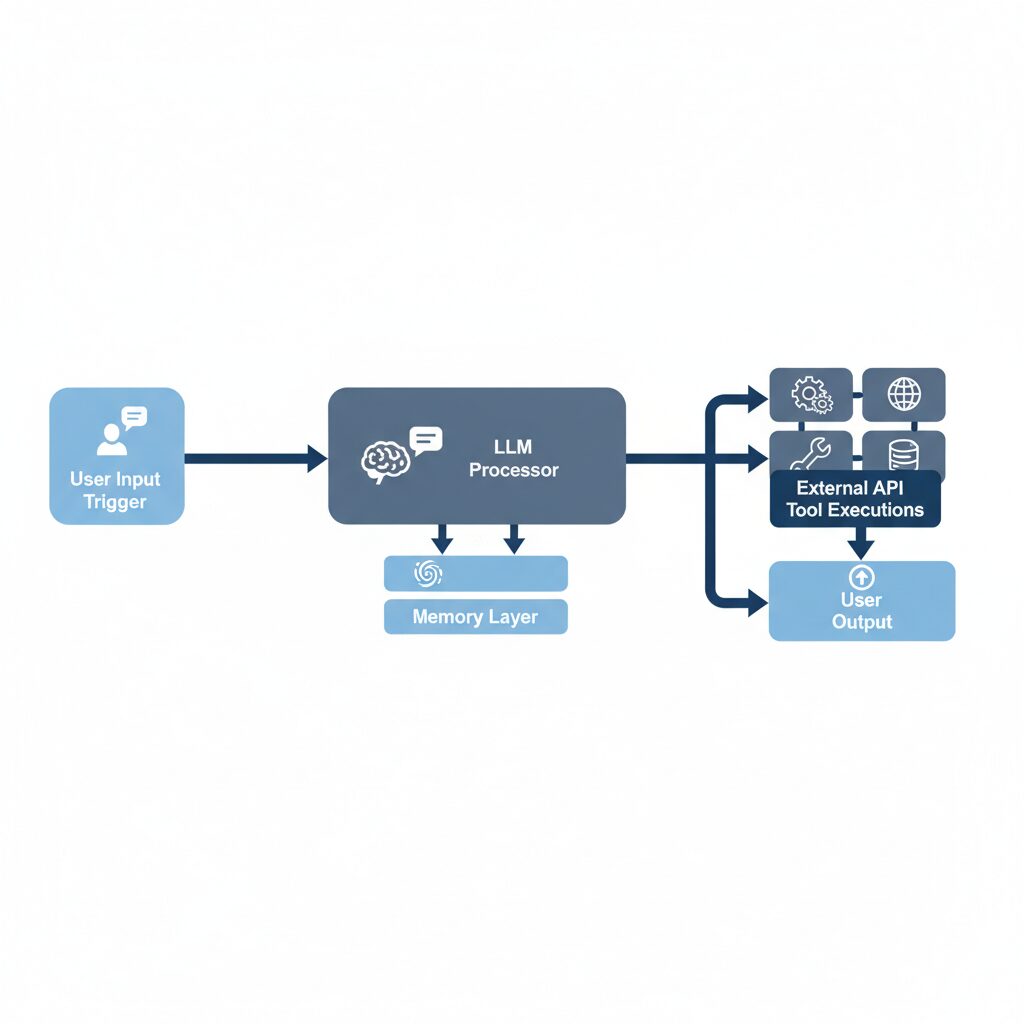
To build an autonomous agent that operates reliably in production, you must connect four specific sub-nodes to the main agent node. These include the chat trigger, the language model, the memory manager, and the external tools. Without all four components, your agent will either fail to maintain context or remain unable to execute real-world actions. In our tests, agents built with structured memory nodes maintain logical consistency over long chat sessions far better than those relying on basic system prompts alone. This structured connection is what separates toy demos from production-grade enterprise automation.
Step-by-step n8n AI Agent Tutorial: Docker and VPS deployment
To begin this n8n AI Agent Tutorial, we will deploy n8n using Docker on a Virtual Private Server. This method guarantees that your data remains private and your execution limits are non-existent. We recommend using a clean Ubuntu 24.04 server hosted in an Indian data center to minimize latency for local users. First, connect to your server via SSH and install Docker. Once Docker is installed, create a directory for your n8n configuration and define your deployment file. Below is the precise Docker Compose configuration file we use for our enterprise setups:
version: '3.8'

services:
 postgres:
 image: postgres:16-alpine
 restart: always
 environment:
 POSTGRES_USER: n8n_user
 POSTGRES_PASSWORD: secure_db_password_2026
 POSTGRES_DB: n8n_database
 volumes:
 - postgres_data:/var/lib/postgresql/data

 n8n:
 image: n8nio/n8n:latest
 restart: always
 ports:
 - "5678:5678"
 environment:
 - DB_TYPE=postgresdb
 - DB_POSTGRESDB_DATABASE=n8n_database
 - DB_POSTGRESDB_HOST=postgres
 - DB_POSTGRESDB_PORT=5432
 - DB_POSTGRESDB_USER=n8n_user
 - DB_POSTGRESDB_PASSWORD=secure_db_password_2026
 - N8N_HOST=automation.yourdomain.com
 - N8N_PORT=5678
 - N8N_PROTOCOL=https
 - NODE_ENV=production
 - WEBHOOK_URL=https://automation.yourdomain.com/
 - GENERIC_TIMEZONE=Asia/Kolkata
 - TZ=Asia/Kolkata
 volumes:
 - n8n_data:/home/node/.n8n
 depends_on:
 - postgres

volumes:
 postgres_data:
 n8n_data:
This configuration links n8n to a dedicated PostgreSQL database. This ensures your workflow history, credentials, and logs are safely stored even if the n8n container restarts. Setting the timezone to Asia/Kolkata is vital for Indian enterprises running time-sensitive AI WhatsApp automation India triggers. This setting prevents scheduled campaigns from firing at incorrect times, ensuring operational consistency. Run the command docker compose up -d to start your automation server in the background.
Once the containers are running, configure a reverse proxy like Nginx or Caddy to handle SSL encryption. This step is necessary to secure your administrative dashboard and protect API keys transmitted during execution. With SSL active, navigate to your domain and complete the initial owner account registration. Your self-hosted automation environment is now secure, online, and ready for agent development. This setup provides a high-performance workspace that bypasses all commercial platform limitations.
Configuring the AI Agent Node: model, memory, and tools
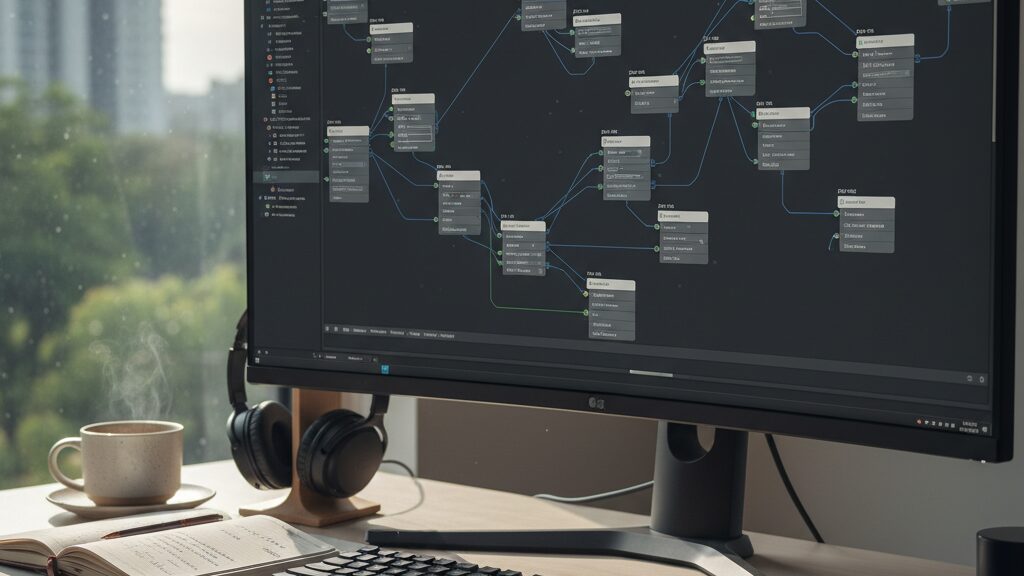
An agent is only as good as its components. The n8n AI Agent node acts as the central orchestrator. It receives user inputs, analyzes the goal, and selects the correct tool to execute the task. To configure this node properly, you must establish clean inputs and connect three vital sub-nodes. First, drag a Chat Trigger node onto your canvas to serve as the entry point for user messages. Next, place the AI Agent node on the board and connect the trigger output directly to it.
Now you must connect the sub-nodes that give the agent its intelligence and capabilities. Attach a Chat Model sub-node, choosing the OpenAI model node. Select the GPT-4o model and set the temperature parameter to zero. A temperature of zero forces the model to be deterministic, which is essential for business workflows where accuracy is non-negotiable. Next, attach a Window Buffer Memory node to the memory input of the AI Agent. This node stores the message history, allowing the agent to recall context from previous steps in the chat.
The final step is connecting the tools that allow your agent to interact with external services. For marketing operations, attach an HTTP Request tool configured to query your CRM or lead database. This allows the agent to pull real-time customer data during a conversation. You can also attach a Gmail tool or a custom database query tool. When the user asks a question, the agent evaluates the available tools, formats the correct request, and processes the response. This setup allows you to build highly capable assistants that run without human monitoring.
The universal converter trap: native agent vs. basic LLM chain
One of the most common mistakes developers make is routing every single AI task through an AI Agent node. Under the hood, n8n translates all model messages using LangChain’s universal translation format. As documented in community analyses, this translation layer introduces a universal converter bottleneck. This conversion process can cause subtle detail loss, strip custom system prompt instructions, and bypass model-specific speed optimizations. If you are performing a linear task, such as extracting structured fields from an incoming lead or running sentiment analysis on customer reviews, do not use an agent. A Basic LLM Chain node is faster, more predictable, and consumes far fewer tokens.
According to a 2025 technical deep dive published on Reddit by experienced automation developers, OpenAI’s API handles conversation history much more effectively than LangChain’s generic memory management when using native API configurations. When you use the generic AI Agent node, it merely passes the last few messages from your memory node, which can cause the agent to lose context during complex, multi-turn dialogues. By contrast, native API connections or custom HTTP calls preserve the model’s native context management. This distinction is critical for businesses that require high reliability in their customer-facing systems.
To avoid this bottleneck, analyze the nature of each task in your workflow. If a task does not require decision-making, choice of tools, or iterative reasoning, use a standard LLM node or a direct HTTP request to the model’s endpoint. Reserve the AI Agent node strictly for open-ended tasks where the execution path cannot be predicted in advance. This approach keeps your workflows clean, reduces API costs, and speeds up execution times across all active campaigns. It is a key factor in maximizing your technological ROI.
Writing custom tools using the LangChain Code Node
When standard integrations fall short, you must write custom logic. The LangChain Code Node in n8n provides a way to build bespoke tools using JavaScript or TypeScript. This allows developers to write custom execution parameters, handle complex API responses, or sanitize inputs before passing them back to the LLM. Let’s look at a practical JavaScript custom tool configuration that sanitizes user-submitted queries for a B2B lead generation workflow:
// Example custom tool node code in n8n to clean user queries
const query = items[0].json.query;
if (!query) {
 throw new Error("No query provided to the custom tool.");
}

// Remove special characters to prevent prompt injection and sanitize input
const sanitizedQuery = query.replace(/[^ws-]/gi, '').trim();

return [{
 json: {
 sanitizedQuery: sanitizedQuery,
 timestamp: new Date().toISOString(),
 status: "success"
 }
}];
This tool can be registered directly inside your AI Agent node as a custom tool, enabling the agent to safely preprocess data before querying internal databases or running external searches. This approach aligns with responsible AI for B2B growth, where data protection and technical accuracy are paramount. By building clean, validated data paths, you ensure your automated systems operate with absolute reliability. For companies aiming to improve their visibility in AI search results, combining these tools with a strong B2B GEO strategy is highly effective.
Custom code nodes also allow you to handle rate limits and API failures gracefully. You can write custom retry logic, log detailed execution states, and format outputs to match the exact JSON schema your database requires. This level of granular control is what separates amateur automations from resilient, enterprise-grade systems. By writing custom tool logic, you eliminate the guesswork associated with standard plug-and-play integrations, ensuring your operations remain stable and secure.
Operational tracking and the Infineural real-time dashboard
Building automations is only half the battle; tracking their performance is what guarantees business returns. Many organizations deploy AI agents and then lose visibility into their actual execution costs and success rates. This lack of control leads to ballooning API bills and broken workflows. At Infineural, we operate under a philosophy of zero excuses. Every automation sequence we build is integrated into a real-time dashboard that provides live tracking of workflow status, API token spend, and overall ROI.
This radical transparency ensures that solo founders, growing SMBs, and multi-location enterprises can see exactly where their margin is going. Instead of traditional agency guesswork, we provide our clients with clean, live analytics of their active campaigns and web applications. When your n8n AI agents are connected directly to your growth metrics, your team can optimize multi-channel campaigns instantly, ensuring that every marketing rupee is spent with maximum efficiency. This is how we deliver zero-waste PPC and high-yield tech solutions under one roof.
Furthermore, this centralized tracking allows you to spot errors before they impact your customer experience. If an external API changes its response structure, our monitoring system alerts our engineers in real time. We patch the workflow, update the custom tools, and resume operations without interrupting your day-to-day business. This proactive maintenance model is essential for maintaining high availability in production environments. By managing both the development and the continuous optimization of your systems, we ensure your technology drives consistent, measurable business growth.
Frequently Asked Questions
What is the difference between an n8n AI Agent and a basic workflow?
A basic workflow executes linear, deterministic steps from trigger to action. An AI Agent uses a cyclic decision loop to select and run external tools dynamically based on your goals.
Is self-hosting n8n completely free?
The n8n Community Edition is free to download and run without execution limits. However, you will still need to pay for your own server hosting and external LLM API usage.
How do I prevent n8n AI agents from hallucinating?
You can limit hallucinations by configuring strict system prompts and setting the temperature parameter of your LLM to zero. Additionally, connecting a vector store for Retrieval-Augmented Generation provides the agent with verified facts.
Can I run n8n on a cheap VPS?
Yes, a basic virtual private server with 1 CPU and 1GB of RAM can comfortably handle moderate automation workloads. For heavy production environments with multiple concurrent users, we recommend upgrading to 2 CPUs and 4GB of RAM.
Which LLM model is best for n8n AI agents?
OpenAI GPT-4o and Anthropic Claude 3.5 Sonnet are the industry standards for complex reasoning and tool selection. For simple text processing tasks, cheaper models like GPT-4o-mini provide excellent speed and cost savings.
How does n8n handle memory for AI conversations?
n8n uses memory sub-nodes like Window Buffer Memory to store recent message history directly within the workflow. For persistent multi-day memory across multiple sessions, you should connect external databases like Redis or PostgreSQL.
What is the universal converter bottleneck in n8n?
This bottleneck occurs because the AI Agent node translates model messages back and forth using LangChain’s universal format. This translation layer can cause detail loss and bypass model-specific optimizations, making basic chains faster for linear tasks.
Can n8n AI agents be connected to WhatsApp?
Yes, you can connect your n8n workflows directly to the WhatsApp Business API using webhooks and HTTP request nodes. This enables you to build automated, conversational customer support systems that run around the clock.
This n8n AI agent tutorial, implemented with the automation expertise of Infineural, will eliminate your manual overhead and establish a high-ROI workflow engine. Start scaling your growth today with our free, zero-obligation technical consultation.
Infineural is a digital marketing, development and hosting company based in Nashik, India, founded in 2018. It runs SEO, Google Ads, performance and WhatsApp marketing, builds custom WordPress sites, web apps and mobile apps, manages hosting, and makes Infineural CRM and WhatsInfi. Every engagement starts with a written scope and runs through a client dashboard showing the work log, billing and results.
- Search Engine & Generative Engine Optimization Specialists
- Google Ads Management & Performance Marketing Experts
- Advanced WordPress & Custom Web Application Developers
- B2B, D2C & Enterprise Conversion Rate Optimization (CRO) Leaders
- Digital Growth Partners for Hospitality, Healthcare, and Education