
Do you want Google to index your content faster?
Of course you do. Every website owner wants their pages to rank high in search results. But simply writing great content is not enough. You need to connect that content so search engines can find it. That is where internal linking comes in.

So, what is internal linking? In short, it is the practice of linking one page on a website to another page on the same website. It sounds simple. However, it is one of the most powerful SEO tactics available today. In fact, without a solid internal linking structure, your site might struggle to rank at all.
Imagine your website is a city. Without roads connecting the buildings, nobody can get anywhere. Internal links are those roads. They guide users and search engines to your most valuable content. If you ignore them, you leave traffic on the table.
In this guide, we will break down exactly how internal linking works. We will show you the strategies we use at Infineural Technologies to boost rankings for our clients. You will learn how to audit your links, optimize your anchor text, and build a site architecture that Google loves. Let’s get started.
The Core Definition: What Is Internal Linking?
An internal link is any hyperlink that points to the same domain as the link exists on. For example, if you are reading a post on our blog and click a link to our Structured Data SEO guide, that is an internal link. You stay on our site.
This is different from an external link. An external link points to a completely different domain. While external links (backlinks) are important for authority, internal links are vital for site structure. They tell Google which pages are related and which ones are most important.
The Technical Side
Technically, an internal link looks like this in HTML:
<a href="http://www.your-site.com/page-a">Link Text</a>
The “Link Text” is known as anchor text. We will discuss why that matters later. For now, just know that these links create a network. This network helps search engine spiders crawl your site effectively. Without links, a page becomes an island. We call these “orphan pages,” and they rarely rank well.
Why Are Internal Links So Important for SEO?
You might be thinking, “Can’t I just focus on getting backlinks?” Not exactly. Backlinks build authority, but internal links distribute that authority. Here are the three main reasons you need a strong internal linking strategy.
1. They Help Google Crawl Your Site
Google uses bots, often called spiders, to browse the web. They follow links to discover new content. If you publish a new page but don’t link to it from anywhere else, Google might never find it. Or, it might take weeks to index it.
By linking from a high-traffic page to a new post, you invite Googlebot to crawl the new content immediately. This is essential for large sites. If you have thousands of pages, you need clear pathways for bots to follow. Otherwise, you waste your crawl budget.
2. They Spread Link Equity
In the SEO world, we talk a lot about “link juice” or link equity. When a page gets a backlink from a high-authority site, it builds value. Internal links allow you to pass that value to other pages on your site.
For instance, your homepage likely has the most authority. By linking from your homepage to a specific service page, you pass some of that authority down. This helps the service page rank better. It is a simple way to boost underperforming pages without building new backlinks.
3. They Improve User Experience
SEO is not just about bots. It is about humans, too. Internal links help visitors navigate your website. They provide context and additional resources. If a user is reading about API Security Best Practices, they might also want to know about TLS encryption. A well-placed link to our TLS Encryption guide keeps them engaged.
When users stay on your site longer, it sends positive signals to Google. It lowers your bounce rate and increases pages per session. These are strong indicators that your content is valuable.
Strategic Internal Linking: The Topic Cluster Model
Now that you know the “why,” let’s talk about the “how.” Randomly adding links is not a strategy. At Infineural Technologies, we recommend the Topic Cluster model. This is the gold standard for modern SEO.
What is a Topic Cluster?
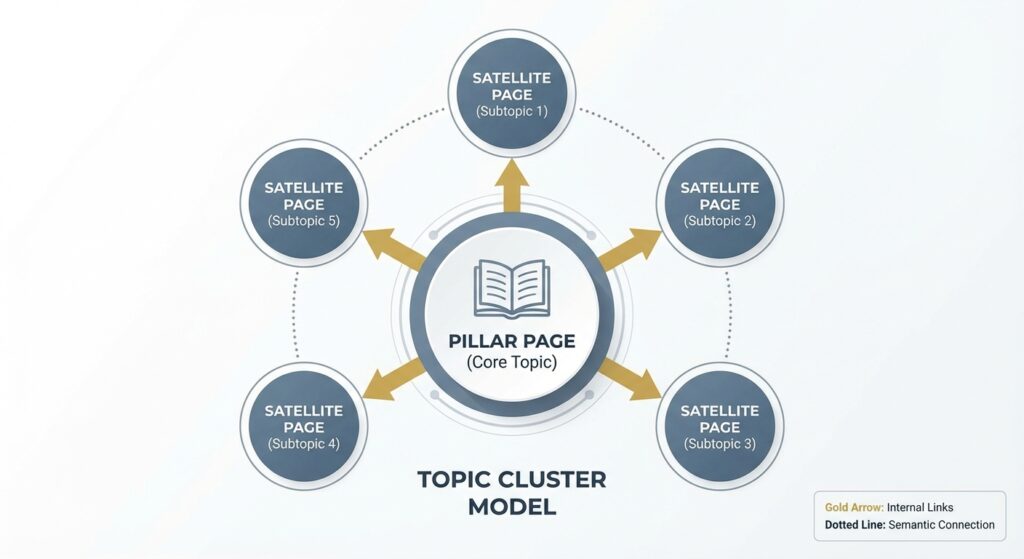
A topic cluster consists of a main “pillar page” and several “cluster content” pages. The pillar page covers a broad topic in depth. The cluster pages cover specific sub-topics. All cluster pages link back to the pillar page, and the pillar page links to the cluster pages.
For example, imagine you run a digital marketing agency. Your pillar page might be “The Ultimate Guide to Digital Marketing.” Your cluster pages could be:
- Data Driven Social Media Growth Strategy
- Email Marketing Tips
- Google Ads Best Practices
- Content Marketing Basics
By linking these together, you signal to Google that you are an authority on digital marketing. You create a semantic relationship between the pages. This helps the entire cluster rank higher.
Implementing the Hub and Spoke
Think of the pillar page as the hub of a wheel. The cluster pages are the spokes. This structure keeps your site organized. It also prevents keyword cannibalization, where multiple pages compete for the same keyword. Instead, each page has a distinct focus, but they support each other.
Best Practices for Anchor Text
Anchor text is the clickable text in a hyperlink. It is incredibly important. Google uses anchor text to understand what the linked page is about. However, you must be careful. If you do it wrong, you can get penalized.
Be Descriptive but Natural
Avoid generic phrases like “click here” or “read more.” These tell Google nothing about the destination page. Instead, use descriptive keywords. For example, if you are linking to a guide on fixing LCP web vitals, use anchor text like “fix LCP web vitals” or “improve Largest Contentful Paint.”
Avoid Over-Optimization
Years ago, SEOs would stuff keywords into anchor text. They would use the exact same keyword every time. Today, Google sees this as spammy. It looks unnatural. You should vary your anchor text.
Here is a safe rule to follow: keep it diverse. Use long-tail variations. Sometimes, use the article title. Occasionally, use natural sentence fragments. The goal is to help the user, not just manipulate the algorithm.
Where to Place Internal Links
Placement matters. A link in the main body content carries more weight than a link in the footer or sidebar. Google knows that users are more likely to click links within the article.
Top of the Fold
Try to include internal links early in your content. This helps reduce bounce rate. If a user lands on a page but realizes it’s not exactly what they wanted, an early link might save the session. They might click through to a related topic instead of leaving your site.
Contextual Relevance
Only add links where they make sense. Don’t force a link to your buyer persona guide in an article about server maintenance unless there is a clear connection. Irrelevant links confuse users and search engines. Ask yourself: “Will this link genuinely help the reader?” If the answer is yes, add it.
Common Internal Linking Mistakes to Avoid
Even experienced marketers make mistakes. We have audited hundreds of sites at Infineural Technologies. Here are the most common issues we see.
1. Broken Internal Links
A broken link points to a page that no longer exists (a 404 error). This is bad for user experience. It is also bad for SEO because it wastes crawl budget. Regular audits are necessary to find and fix these.
2. Orphan Pages
As mentioned earlier, an orphan page has zero internal links pointing to it. Google struggles to find these pages. Often, these are old blog posts that got buried. You should review your content library and add links to these pages if they are still valuable.
3. Excessive Linking
Do not go overboard. Google’s guidelines suggest keeping links on a page to a “reasonable number.” If you have 200 links on a 500-word post, it looks spammy. Plus, the more links you have, the less value each individual link passes. Stick to what is useful for the reader.
4. Nofollow Tags on Internal Links
Generally, internal links should be “dofollow.” This tells Google to follow the link and pass equity. Sometimes, plugins or settings accidentally add “nofollow” tags to internal links. This stops the flow of authority. Always check your code to ensure your internal links are dofollow.
How to Audit Your Internal Links
You cannot improve what you do not measure. Auditing your internal links is a vital part of technical SEO. Here is a simple process you can follow.
Use a Crawling Tool
Tools like Screaming Frog or Ahrefs are excellent for this. They crawl your site just like Google does. They will report broken links, redirect chains, and orphan pages. Run a crawl at least once a month.
Check Google Search Console
Google Search Console has a “Links” report. It shows you which pages have the most internal links. Often, you will find that your “About Us” or “Contact” pages have the most links because they are in the navigation menu. That is fine. However, you should check your key blog posts. Do your most important articles have enough links? If not, you need to add more.
Identify Power Pages
Find the pages on your site with the most backlinks. These are your “power pages.” They have the most authority to give. Go to these pages and look for opportunities to link to your newer or lower-ranking content. This is the fastest way to boost rankings for specific keywords.
Advanced Tip: Managing Crawl Budget
For massive websites with thousands of pages, crawl budget is a real concern. Google will only spend a certain amount of time crawling your site. If you have inefficient internal linking, bots might get stuck in loops or waste time on unimportant pages.
You can manage this by using internal links strategically. Direct bots toward your high-priority pages. Use your robots.txt file to block low-value pages (like admin pages or tag archives) so bots don’t waste time there. This ensures that your valuable content, like your Advanced Google Ads Account Structures guide, gets indexed and refreshed frequently.
People Also Ask (FAQ)
What is the ideal number of internal links per page?
There is no magic number, but 3 to 5 internal links for every 1,000 words is a good baseline. Focus on user value rather than hitting a specific count.
Can too many internal links hurt SEO?
Yes, excessive linking dilutes the value passed to each page and can look spammy. It may also overwhelm users, leading to a poor experience.
Should internal links open in a new tab?
Generally, internal links should open in the same tab to keep the navigation flow natural. Only external links or downloads usually open in new tabs.
Do internal links help with ranking?
Absolutely. They distribute page authority and help Google understand the context of your content. They are a primary ranking factor.
What is the difference between internal links and backlinks?
Internal links connect pages on the same website. Backlinks come from other websites pointing to yours.
How do I fix orphan pages?
Identify them using a site audit tool. Then, find relevant existing content on your site and add links pointing to the orphan pages.
Is anchor text really that important?
Yes, it tells Google what the destination page is about. Using descriptive keywords in anchor text helps rank for those terms.
Can I link to the same page twice in one post?
You can, but it is usually unnecessary. Google typically only counts the anchor text of the first link.
Conclusion
Internal linking is not glamorous. It doesn’t get the same hype as viral content or massive backlink campaigns. But it is the backbone of a healthy website. It helps Google understand your site, spreads authority to where it is needed, and keeps users engaged.
If you ignore internal linking, you are making it harder for your site to succeed. So, take the time to audit your links. Build topic clusters. Fix your broken paths. The results will follow.
Do you need help structuring your website for maximum visibility? At Infineural Technologies, we specialize in technical SEO and content strategy. We can help you build a site architecture that drives traffic and revenue. Contact us today to start your growth journey.