Do you want to know the fastest way to kill your conversion rates? Have a slow website. Seriously. If your WordPress site takes more than three seconds to load, over half your visitors are gone before they even see your headline. Google knows this. That’s why they introduced Core Web Vitals.

You might be thinking, "I installed a caching plugin, so I'm good, right?" Wrong.
Optimizing WordPress for Core Web Vitals isn't just about installing a plugin and forgetting it. It is about granular control over how your server talks to your browser. At Infineural Technologies, we have audited hundreds of sites. The ones that rank #1? They obsess over these metrics. The ones that fail? They ignore the technical foundation. If you want to dominate the SERPs, you need to fix your LCP, INP, and CLS. Today.
The Bottom Line Up Front (BLUF)
Here is the deal. You don't have time to read a novel. You want results. To pass Core Web Vitals on WordPress, you must do three things immediately:
- Fix LCP (Largest Contentful Paint): Optimize your hero image and upgrade your hosting stack. If you are using Elementor, you have extra work to do.
- Stabilize CLS (Cumulative Layout Shift): Set explicit width and height attributes for every single image and video. Stop your content from jumping around.
- Reduce INP (Interaction to Next Paint): Minify JavaScript and delay non-essential script execution. If the user clicks and nothing happens instantly, you fail.
Ready to dig deeper? Let’s get your scores into the green.
Why Core Web Vitals Are the New Gold Standard
Google has been telling us for years that speed matters. But recently, they shifted the goalposts. It is no longer just about loading speed; it is about rendering stability and interactivity.
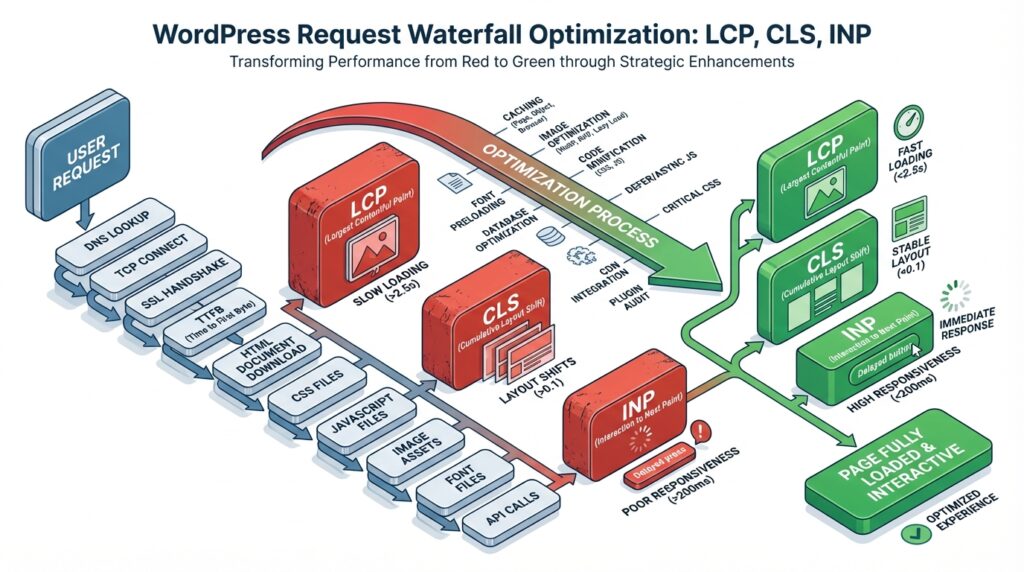
Core Web Vitals are made up of three specific metrics. You need to understand them to beat them.
1. Largest Contentful Paint (LCP)
This measures how long it takes for the main content (usually an image or headline) to load. Anything over 2.5 seconds needs work. This is usually the hardest metric for WordPress users because of heavy themes.
2. Interaction to Next Paint (INP)
This replaced FID (First Input Delay). It measures responsiveness. When a user clicks a button, how fast does the browser react? If you have heavy JavaScript running in the background, your INP suffers.
3. Cumulative Layout Shift (CLS)
Visual stability. Have you ever tried to click a link, and suddenly an ad loads, pushing the link down, and you click the wrong thing? That is bad CLS. Google hates it. Users hate it.
Step 1: The Hosting Foundation
You cannot build a race car on a tricycle engine. Most people try to optimize WordPress for Core Web Vitals while hosting their site on a cheap $5 shared server. It won't work.
Your Time to First Byte (TTFB) is the bottleneck. If your server takes 1 second to even start sending data, you have already lost 40% of your LCP budget.
We recommend using a stack that supports the latest PHP versions and database engines. Speaking of databases, an outdated SQL version can drag your site down significantly. In our technical audits, we often find that simply upgrading the database engine solves massive latency issues. Check out our guide on Upgrade MariaDB on CWP Fixing DNF Conflicts EL8 to see how backend updates directly impact frontend speed.
Step 2: Conquering LCP (The Big One)
LCP is where most WordPress sites fail. Why? Large hero images and bloat from page builders.
If you are using Elementor, you are loading a lot of CSS and JS that you might not need. But you don't have to ditch your page builder to rank. You just need to be smarter about it.
Tactics to crush LCP:
- Preload the Hero Image: Tell the browser to prioritize the image above the fold.
- Use WebP or AVIF: These formats are vastly smaller than PNG or JPEG.
- Defer Offscreen Images: Lazy load everything below the fold. But—and this is vital—never lazy load your hero image. That kills your LCP score.
For a deep dive into specifically fixing this on popular builders, read our guide on Fix Largest Contentful Paint WordPress Elementor: The 2026 Guide to Green Scores. We also have a broader strategy breakdown in How to Fix LCP Web Vitals: 10+ Pro Fixes for 2026.
Step 3: Eliminating Layout Shifts (CLS)
CLS is annoying. It makes your site look broken. The fix is usually simple but tedious.
Reserve Space for Images:
In WordPress, ensure every image has height and width attributes. If you don't define the space, the browser collapses it until the image loads, causing the layout to shift when it finally appears.
Font FOUT/FOIT:
Web fonts can cause shifts if the fallback font has different dimensions than your custom font. Use `font-display: swap` in your CSS. It allows the text to show up immediately in a system font before swapping to your fancy font.
Step 4: Improving Interactivity (INP)
This is the silent killer. Your site looks loaded, but when I click "Menu," nothing happens for a second. Why? Because the main thread is blocked by JavaScript.
WordPress plugins love to load scripts on every page, even where they aren't used. A contact form plugin loading its JS on your blog post? Useless bloat.
The Fix:
Use an asset manager to unload scripts where they aren't needed. Delay the execution of non-essential JS (like chat widgets or analytics) until after user interaction. This clears the main thread for the user.
The Role of Security in Speed
Did you know your security setup affects your speed? It’s true.
The handshake between the browser and the server takes time. Modern encryption protocols like TLS 1.3 are faster than their predecessors because they require fewer round trips to establish a connection. If you are still running old SSL protocols, you are slowing down every single visitor.
We break this down in our article on TLS Encryption: A Developer’s Guide to Modern Web Security. Speed and security go hand in hand.
Advanced WordPress Optimization Tactics
You have done the basics. Now let's get advanced.
Internal Linking and Crawl Depth
Believe it or not, your site structure impacts how efficiently bots crawl and index your speed improvements. A messy structure wastes crawl budget. A tight, semantic structure helps Google understand your entity relationships faster. Read What Is Internal Linking? The Ultimate Guide to Better Rankings to get this right.
Structured Data
While Schema doesn’t directly boost page speed, it helps search engines parse your content without needing to render every pixel immediately to understand the context. It is an efficiency play. Learn more at Structured Data SEO Unlock Rich Snippets & Boost Rankings.
People Also Ask (FAQ)
What is the most important Core Web Vital?
LCP is generally considered the most significant because it marks the point when the main content of the page has likely loaded.
Can I fix Core Web Vitals without coding?
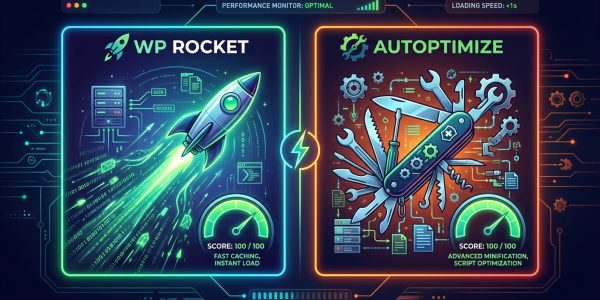
Yes, mostly. You can use caching plugins like WP Rocket and image optimizers, but achieving a perfect 100 often requires some server-level or CSS tweaks.
Does removing plugins improve speed?
Absolutely. Every plugin adds code. Remove any plugin you do not use to reduce the payload sent to the browser.
How does hosting affect Core Web Vitals?
Drastically. A slow server response (TTFB) delays every other metric. No amount of frontend optimization can fix a slow server.
What is a good LCP score?
Anything under 2.5 seconds is considered "Good" by Google. Between 2.5 and 4.0 seconds is "Needs Improvement."
Does lazy loading help LCP?
It helps overall page load, but do not lazy load the LCP element (usually the top image). That will actually hurt your score.
Why is my mobile score lower than desktop?
Mobile devices have slower processors and rely on mobile networks (4G/5G), which have higher latency than WiFi.
How often does Google update Core Web Vitals data?
The data in Search Console is based on the Chrome User Experience Report (CrUX) and operates on a rolling 28-day window.
Conclusion
Optimizing WordPress for Core Web Vitals is not a one-time task. It is a continuous process of refining your code, optimizing your assets, and monitoring your server performance.
Google has drawn a line in the sand. You either provide a great user experience, or you get pushed to page two. Don’t let technical debt hold your business back.
If you are tired of guessing why your site is slow, let us handle it. At Infineural Technologies, we specialize in technical SEO and high-performance development. We don’t just patch problems; we architect solutions.
Ready to fly? Contact Infineural Technologies today and let's get your scores to 100.