Is your online store leaking money?
It probably is.

If your WooCommerce site takes more than 3 seconds to load, 40% of your visitors are gone. Just like that. They aren't coming back.
Core Web Vitals aren't just some vanity metrics from Google. They are direct indicators of your user experience. And in e-commerce, user experience equals revenue. A slow checkout? That's an abandoned cart. A shifting product image? That's a missed click.
You built your store on WooCommerce because it's flexible. But out of the box? It's heavy. It loads scripts where it shouldn't. It bloats your database. And it kills your speed scores.
We need to fix that.
In this guide, I'm going to show you exactly how to strip the fat off WooCommerce without breaking your site. We are going to turn that sluggish shop into a lean, conversion-generating machine.
Key Takeaways:
- LCP: Optimize product images to load instantly.
- INP: Kill the AJAX cart fragments that delay clicks.
- CLS: Stabilize your layout so buy buttons don't jump.
- Bloat: Stop WooCommerce scripts from loading on blog posts.
The WooCommerce Weight Problem
Here is the brutal truth.
WooCommerce was built for functionality, not speed. When you activate it, it injects styles, scripts, and database queries onto every single page of your site. Even your contact page. Even your blog posts.
Does your 'About Us' page need to check if the shopping cart is empty? No. But WooCommerce checks anyway.
This extra code hurts your Core Web Vitals. Specifically, it destroys your Interaction to Next Paint (INP) and Largest Contentful Paint (LCP). At Infineural Technologies, we see this constantly. Store owners add plugins to increase sales, but those plugins slow the site down, reducing sales. It is a vicious cycle.
Before we attack the specific WooCommerce issues, you need a solid foundation. If your host is slow or your theme is garbage, no amount of tweaking will save you. For a complete breakdown of the basics, read our pillar guide on Optimizing WordPress for Core Web Vitals: The 2026 Speed Guide.
Fixing Largest Contentful Paint (LCP) on Product Pages
LCP measures how fast the main content loads. On a product page, that is your product image.
If your customer stares at a blank white space for 2 seconds waiting for the shirt or shoe to appear, you have failed.
1. Stop Lazy Loading the Main Image
Lazy loading is great for images below the fold. But most lazy load plugins blindly apply it to everything. If you lazy load the hero image (the main product photo), the browser waits for the JavaScript to fire before it fetches the image.
That is too slow.
You must exclude the main product image from lazy loading. If you are using an optimization plugin, look for the 'Excluded Images' field. Add the class name or filename pattern of your main product gallery.
2. Serve Next-Gen Formats
Don't serve JPEGs from 2010. Use WebP or AVIF. These formats are significantly smaller and load faster. Most optimization plugins handle this automatically now. If you aren't doing this, you are leaving money on the table.
3. Use a CDN
Your server is in New York. Your customer is in London. Why make the data travel across the ocean every time?
Use a Content Delivery Network (CDN). It stores copies of your images on servers all over the world. The image loads from the server closest to the customer. It is simple physics. Closer equals faster.
For more on reducing render-blocking resources that delay LCP, check our guide on eliminating render-blocking resources.
Solving the AJAX Cart Fragments Nightmare (INP)
This is the big one.
Have you ever run a speed test and seen a warning about wc-ajax=get_refreshed_fragments? That is WooCommerce checking the cart contents. It can take 1 to 5 seconds to respond on a slow server.
While it is thinking, your site freezes. This creates poor Interaction to Next Paint (INP) scores.
The Fix: Disable Cart Fragments
You don't need the cart to update dynamically on every single page load. You only need it when someone actually adds something to the cart.
You can use a lightweight plugin to 'Disable Cart Fragments' or add a code snippet to your functions file to dequeue this script on non-WooCommerce pages. This single change can cut seconds off your load time and improve responsiveness instantly.
We dive deeper into interaction delays in our Interaction to Next Paint WordPress Optimization Guide.
Stopping Cumulative Layout Shift (CLS)
Nothing is more annoying than trying to click 'Add to Cart' and having the button jump down because an image just loaded.
That is Cumulative Layout Shift.
In WooCommerce, this usually happens because:
- Product Images lack dimensions: The browser doesn't know how big the image is until it downloads. Reserve that space in the CSS.
- Price fonts load late: If you use a custom font for prices, the text might flash or shift when the font file finally arrives.
- Notice Bars: Top banners that slide in late push the whole site down.
Set explicit width and height attributes for all product images and thumbnails. Preload your fonts. Make your layout rock solid.
Need to fix this manually? Read How to Reduce Cumulative Layout Shift WordPress Manually (2026).
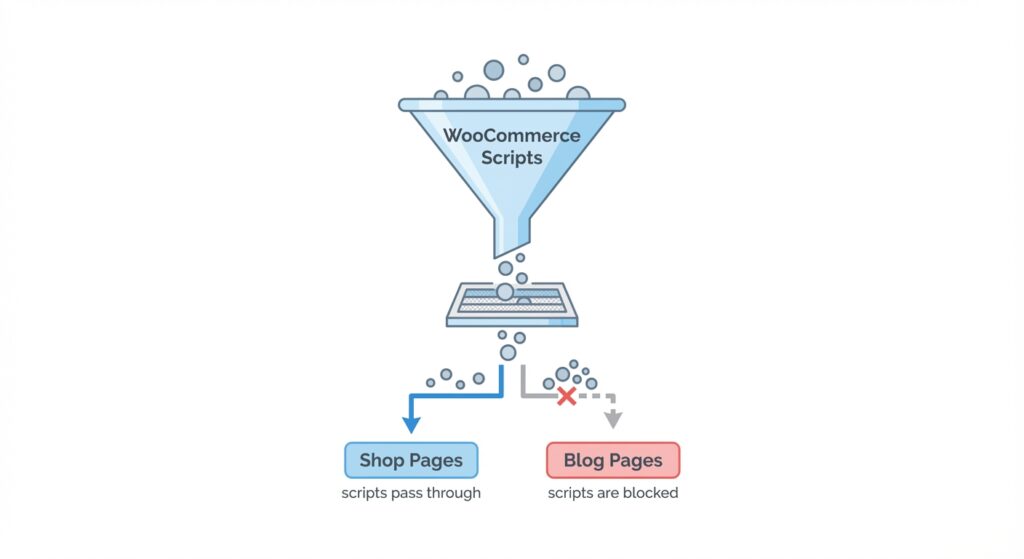
Debloating: Remove WooCommerce Styles from Non-Shop Pages
Why load `woocommerce-layout.css` on your privacy policy page?
It is wasted data. It blocks the rendering of the page. You should conditionally unload these assets.
You can use a plugin like Asset CleanUp or Perfmatters (check our Speed Stack guide for recommendations). Set rules: "If the page is NOT a product, cart, or checkout, do NOT load WooCommerce scripts."
This reduces the payload size significantly. Less code to parse means the browser paints the screen faster.
Database Optimization for High-Volume Stores
WooCommerce loves to fill your database. Transient options, customer sessions, and logs pile up.
A bloated database slows down backend queries. This increases the Time to First Byte (TTFB). If the server takes 2 seconds to build the HTML, your LCP will be at least 2 seconds plus load time.
- Clean Transients: Regularly delete expired transients.
- Limit Revisions: You don't need 50 versions of a product description. Keep the last 5.
- Disable Pingbacks: They are useless and clutter your database.
Hosting: The Engine Room
You cannot run a high-performance WooCommerce store on a $3/month shared hosting plan. You just can't.
Shared hosting creates resource contention. If your neighbor on the server gets a traffic spike, your store slows down. For WooCommerce, you need managed hosting or a VPS with isolated resources.
Look for hosts that offer server-level caching (like Varnish or Nginx FastCGI) but understand the nuances of WooCommerce. You cannot cache the cart or checkout pages. A good host knows this and configures the exclusion rules for you.
Is your theme holding you back? Some themes are just too heavy. See our data on the Fastest Lightweight WordPress Themes for Core Web Vitals.
Frequently Asked Questions
How do I improve WooCommerce Core Web Vitals quickly?
Switch to a faster host, use a caching plugin like WP Rocket, and optimize your images using WebP format. These three steps provide the biggest immediate impact.
Does WooCommerce slow down WordPress?
Yes, by default it adds extra scripts and database queries to every page. You must optimize it by unloading these assets on non-shop pages to maintain speed.
What is the best image size for WooCommerce products?
Ideally, use images around 800-1000px wide for the main view and compress them under 100KB. Always serve next-gen formats like WebP or AVIF.
How do I fix the 'unused javascript' warning in WooCommerce?
Use an asset manager plugin to dequeue WooCommerce scripts on pages where they aren't needed, like your blog posts or homepage (if no products are shown).
Why is my mobile score lower than desktop?
Mobile devices have slower processors. Heavy JavaScript execution hurts them more. Focus on reducing main-thread work and JavaScript payload size.
Should I use a CDN for my WooCommerce store?
Absolutely. A CDN serves images and static files from servers closer to your customers, drastically reducing load times for international visitors.
What is the `wc-ajax` issue?
It is a script that updates the cart count dynamically but often causes delays. Disabling cart fragments on non-catalog pages fixes this.
Does removing plugins help speed?
Yes. Every plugin adds code. Audit your site and delete any plugin that doesn't directly contribute to sales or essential functionality.
Ready to Scale Your Revenue?
Speed isn't a technical exercise. It is a business strategy. Faster sites rank higher, convert better, and make more money.
Don't let a slow store limit your growth. If you are tired of guessing and want guaranteed results, we can help. At Infineural Technologies, we specialize in turning sluggish WordPress sites into performance leaders.
Contact us today for a comprehensive audit. Let's make your site fast.