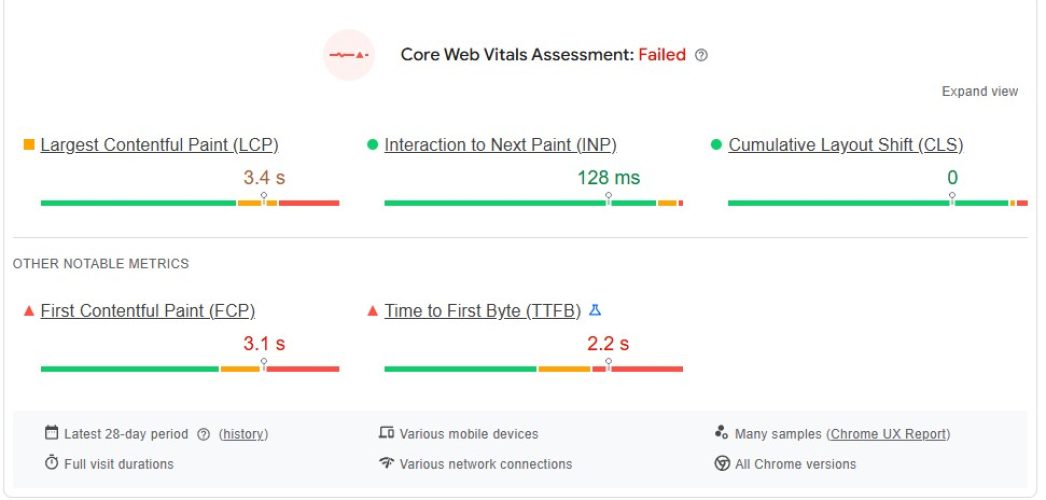
You’ve spent months perfecting your website’s design and content. You’re finally starting to see organic traffic climb. Then, you open Google Search Console only to find a “Failing” status on your Core Web Vitals. The culprit? Largest Contentful Paint (LCP).
In today’s search landscape, speed is no longer just a luxury; it is a fundamental requirement. Google’s page experience signals have made it clear that if your main content doesn’t appear within 2.5 seconds, you are losing both rankings and revenue.
But fixing LCP isn’t just about “optimizing images.” It’s about understanding the entire critical rendering path. Whether you are a web designer frustrated by performance scores or a business owner watching your bounce rates climb, this guide will walk you through exactly how to fix LCP Web Vitals using advanced, industry-proven techniques.

What Exactly is Largest Contentful Paint (LCP)?
Largest Contentful Paint is a user-centric metric that measures the perceived loading speed of a page. Specifically, it marks the point in the page load timeline when the largest text block or image element becomes visible within the viewport.
Unlike “First Contentful Paint” (which tracks the very first pixel), LCP focuses on the most meaningful piece of content. If a user lands on a blog post, the LCP is likely the featured image or the H1 headline. If they land on a product page, it’s the product photo.
The LCP Thresholds You Must Hit
To pass the Core Web Vitals assessment, you need to meet the following criteria for at least 75% of your page views:
- Good: ≤ 2.5 seconds
- Needs Improvement: 2.5s – 4.0s
- Poor: > 4.0 seconds
At Infineual Technologies, we’ve seen that moving from “Poor” to “Good” can result in a 15-20% increase in conversion rates simply by reducing user frustration and abandonment.
LCP (Largest Contentful Paint) Thresholds
The 4 Pillars of LCP: Why Your Scores are Low
To know how to fix LCP Web Vitals, you must first understand that LCP is the sum of four distinct phases. If any of these are delayed, your total score suffers.
- Time to First Byte (TTFB): The time it takes for the server to respond.
- Resource Load Delay: The time between the first byte and when the browser starts downloading the LCP element.
- Resource Load Duration: How long it actually takes to download that element.
- Element Render Delay: The time between the download finishing and the element appearing on the screen.
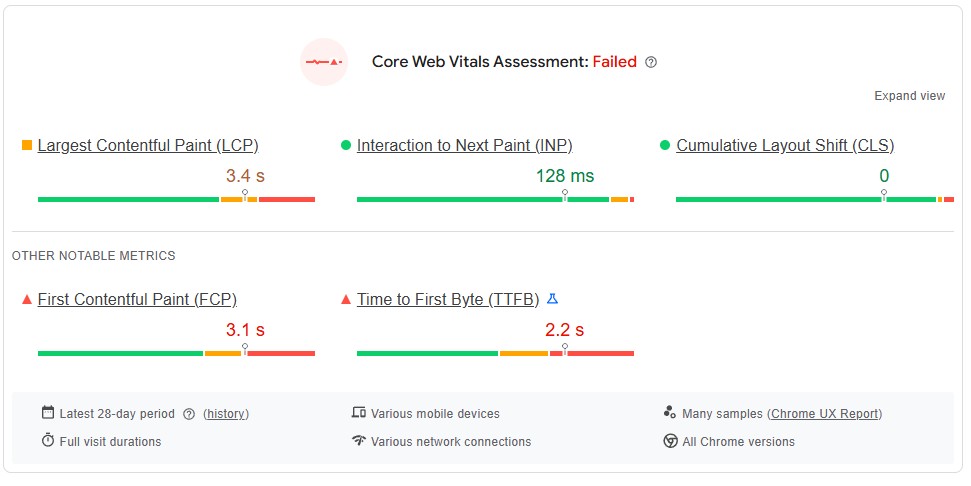
Phase 1: How to Fix LCP by Optimizing Server Response (TTFB)
Your LCP can never be faster than your server’s response time. If your TTFB is 1.5 seconds, you only have 1 second left for everything else to happen to stay in the “Good” range.
1. Implement Edge Caching and CDNs
Standard hosting often involves a user in London requesting data from a server in New York. This physical distance adds latency. By using a Content Delivery Network (CDN) like Cloudflare or Akamai, you serve a cached version of your HTML from a “PoP” (Point of Presence) closest to the user.
2. Optimize Your Database and Backend Logic
For dynamic sites (like WordPress or E-commerce), slow TTFB is often caused by bloated databases or poorly coded plugins.
- Action: Use a plugin or tool to clean up overhead in your SQL tables.
- Infineual Tip: We recommend switching to Object Caching (Redis/Memcached) to reduce the load on your server’s CPU during high-traffic periods.
Phase 2: Eliminating Resource Load Delay
This is where most technical SEOs fail. Even if your image is optimized, the browser might not “see” it until it has finished downloading 50 other low-priority files.
3. The Magic of Priority Hints (fetchpriority)
This is one of the most effective ways to fix LCP Web Vitals in 2026. By default, browsers treat all images with the same priority. You can override this by adding fetchpriority="high" to your LCP element.
<img src="hero.jpg" fetchpriority="high" alt="Main Product">
This tells the browser to move this specific image to the front of the download line, often shaving 500ms to 1s off your LCP.
4. Preload Your LCP Asset
If your LCP element is defined in an external CSS file (like a background-image), the browser won’t find it until it downloads and parses that CSS. You can force the discovery by adding a preload tag in your HTML <head>:
<link rel="preload" as="image" href="hero.jpg">
Learn more about technical SEO audits for high-performance sites
Phase 3: Reducing Resource Load Duration
This phase is all about file size and network efficiency. If your LCP image is 2MB, it doesn’t matter how fast your server is—it will take time to travel across the wire.
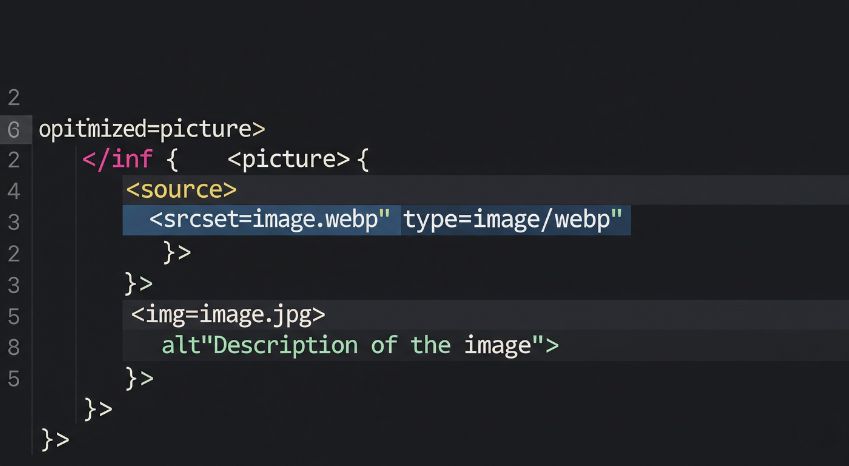
5. Switch to Next-Gen Formats (AVIF & WebP)
JPEG and PNG are legacy formats. AVIF and WebP offer significantly better compression without losing quality.
- AVIF: Often 50% smaller than JPEG.
- WebP: Usually 30% smaller than JPEG.
6. Use Responsive Images with srcset
Serving a 2000px wide image to a mobile user with a 375px screen is a waste of bandwidth. Use the srcset attribute to provide different image versions for different screen sizes.
Phase 4: Minimizing Element Render Delay
The image has arrived. The server is fast. But the screen is still blank. Why? Because the browser is “blocked” by JavaScript or CSS.
7. Inline Critical CSS
The browser won’t render anything until it has loaded all CSS files in the <head>. To fix LCP Web Vitals, identify the “Critical CSS”—the styles needed for above-the-fold content—and put them directly in a <style> tag in the HTML. Defer the rest of the stylesheet.
8. Defer Non-Essential JavaScript
JavaScript is the most expensive resource on the web. It blocks the main thread, preventing the browser from “painting” the LCP element.
- Fix: Use the
deferorasyncattributes for all scripts that aren’t required for the initial render (e.g., tracking scripts, chatbots, or social media widgets).
Advanced Fixes: Speculation Rules and Signed Exchanges
If you have already done the basics and are still struggling, it’s time to look at the “cutting edge” of web performance.
9. Implement the Speculation Rules API
This is a relatively new way to fix LCP Web Vitals by pre-rendering the next page before the user even clicks the link. When the user eventually clicks, the LCP is near-instant (0.1s to 0.3s) because the page was already loaded in a hidden tab.
10. Use Signed Exchanges (SXG)
If much of your traffic comes from Google Search, Signed Exchanges allow Google to cache your pages on their own servers and serve them directly from the search results page. This virtually eliminates the TTFB delay.
The “Hidden” LCP Killers: What Most Guides Miss
During our competitive research, we found several factors that are rarely mentioned but have a massive impact on your scores:
- Custom Fonts: If your H1 headline is your LCP element, but your custom font takes 3 seconds to load, the LCP won’t trigger until the text is visible. Use
font-display: swap;or preload your fonts to prevent “Flash of Invisible Text” (FOIT). - Client-Side Rendering (CSR): If you use a framework like React or Vue without Server-Side Rendering (SSR), your LCP will always be poor because the browser has to download a massive JS bundle before it can even build the HTML to show the LCP element. Switch to SSR or Static Site Generation (SSG) to fix this.
Why Partner with Infineual Technologies for LCP Optimization?
Navigating the complexities of Core Web Vitals can feel like a full-time job. Between managing server configurations, minifying code, and ensuring mobile responsiveness, it’s easy to get lost in the weeds.
At Infineual Technologies, we specialize in bridge the gap between high-end web design and elite technical SEO. We don’t just give you a list of things to do; we implement the fixes that move the needle.
Whether you need a full site rebuild on a performance-first architecture or a surgical optimization of your current infrastructure, our team ensures your “Good” status is maintained year-round.
Talk to our Technical SEO Strategists
Frequently Asked Questions (FAQ)
1. Is LCP a ranking factor? Yes, LCP is a core component of Google’s Page Experience signals and directly impacts your organic search rankings.
2. What is a good LCP score for mobile? A “Good” LCP score for both mobile and desktop is 2.5 seconds or less.
3. Why is my LCP higher on mobile than desktop? Mobile devices have slower processors and often use slower network connections (3G/4G), which increases the time needed for Resource Load and Render phases.
4. Can a text block be the LCP element? Yes, the largest visible element can be a paragraph (<p>), a heading (<h1>–<h6>), or a list element.
5. Does lazy-loading help LCP? No. In fact, lazy-loading your LCP image will hurt your score because the browser has to wait for a script to run before starting the download. Never lazy-load above-the-fold images.
6. What is the difference between LCP and FCP? FCP (First Contentful Paint) is when the first piece of content appears. LCP is when the largest and usually most important piece appears.
7. How often does Google update Core Web Vitals data? The data in Google Search Console is based on a 28-day rolling average of real-user data (CrUX).
8. Will a CDN always fix my TTFB? Not necessarily. A CDN helps with latency, but if your server-side code is slow or your database is unoptimized, you will still have a high TTFB.
9. Can I ignore LCP if my content is great? Great content is still the #1 ranking factor, but a poor LCP acts as a “tie-breaker” and can significantly lower your conversion rates due to poor UX.
10. What tool is best for measuring LCP? For real-world data, use Google Search Console. For real-time debugging, use the “Performance” tab in Chrome DevTools.
Conclusion: Stop Losing Traffic to a Slow Site
Learning how to fix LCP Web Vitals is one of the highest-ROI activities you can perform for your website. By reducing the time it takes for your users to see your value, you improve your rankings, build brand trust, and drive more revenue.
Don’t let technical hurdles stand in the way of your business goals. Take the first step toward a lightning-fast web experience today.
Ready to get into the Green? Talk to an expert at Infineual Technologies today and let’s optimize your site for the future of search.