Do you know why most WordPress sites fail Core Web Vitals?
It isn't always the hosting. And it usually isn't the image compression.

It's the foundation. The theme.
You see, picking a theme based on screenshots is a trap. It looks great on the demo site. But once you install it? It loads dozens of CSS files, bloated JavaScript libraries, and external fonts you don't even use.
That kills your speed. And when speed dies, rankings drop.
At Infineural Technologies, we've tested hundreds of setups. We know that the fastest lightweight WordPress themes for Core Web Vitals share one trait: they do less, so you can rank higher.
If you want to pass Google's strict metrics—especially Interaction to Next Paint (INP) and Largest Contentful Paint (LCP)—you need a lean code base.
Here is the data-backed list of themes that actually deliver green scores in 2026.
Why 'Lightweight' is the Only Metric That Matters
Let's get technical for a second.
Google doesn't rank your site based on how pretty the animations are. They rank based on User Experience standards known as Core Web Vitals.
A heavy theme injects bloat into the DOM (Document Object Model). A large DOM size increases the time the browser takes to calculate styles and layout. This directly hurts your LCP and INP scores.
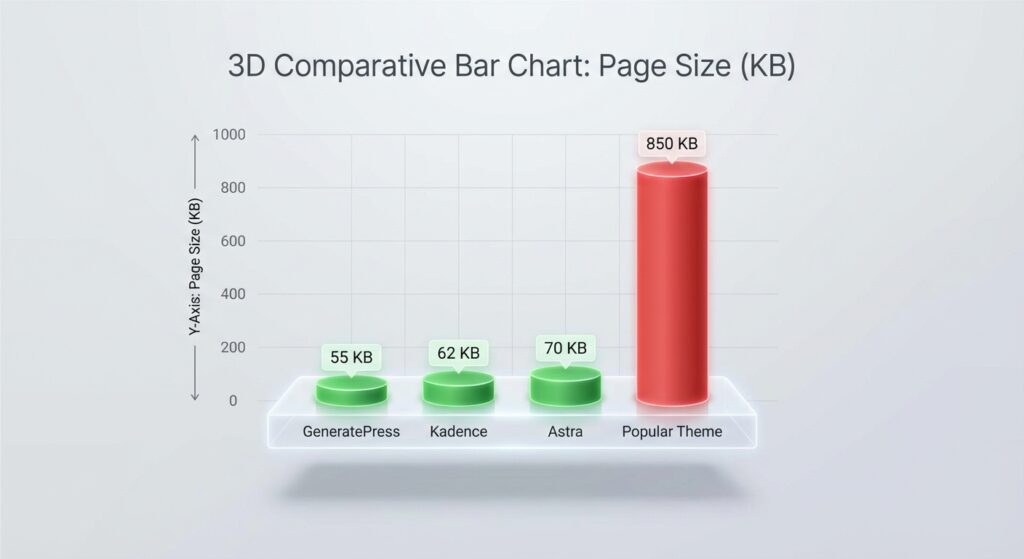
Key Takeaway: A lightweight theme should have a total page size of under 50KB on a fresh install and make fewer than 10 HTTP requests.
We discuss the full strategy for server-side tuning in our pillar guide on Optimizing WordPress for Core Web Vitals: The 2026 Speed Guide. But for now, let's fix your frontend foundation.
1. GeneratePress (The Gold Standard)
If you ask any performance engineer what they use for their personal sites, half of them will say GeneratePress.
Why?
Because it is obsessed with stability and speed. Tom Usborne, the developer, built this theme to be modular.
On a default install, GeneratePress adds less than 10KB to your page size. That is tiny. It doesn't use jQuery (which is a major render-blocking culprit). It uses vanilla JavaScript.
Why it wins for Core Web Vitals:
- Zero Dependencies: No heavy frameworks.
- Modular Architecture: You can disable features you don't use. If you aren't using the secondary navigation, the CSS for it never loads.
- LCP Optimization: Because the code is so light, the browser paints the largest content element almost instantly.
We use this frequently at Infineural. It gives us a perfect 100/100 starting point.
2. Kadence WP (Performance Meets Design)
GeneratePress is fast, but some users find it too bare-bones. Enter Kadence.
Kadence strikes a balance. It offers a powerful drag-and-drop header and footer builder without sacrificing performance. Usually, builders add bloat. Kadence doesn't.
It loads CSS only for the blocks you are actually using on a specific page. This technique, called "conditional loading," is essential for passing the Cumulative Layout Shift (CLS) metric.
The INP Advantage:
Since Interaction to Next Paint became a ranking factor, Kadence updated their code to ensure event listeners don't delay browser response. If you are struggling with responsiveness, check out our deep dive on the Interaction to Next Paint WordPress Optimization Guide: 2026 Fixes.
3. Blocksy (The Modern Contender)
Blocksy is newer than the others. But it was built in the era of Gutenberg.
Legacy themes have to patch their code to work with the WordPress Block Editor. Blocksy was built for it. It uses modern Webpack technologies to split code effectively.
What I love about Blocksy is the lazy loading implementation. It handles images and scripts smartly out of the box, which helps reduce the initial payload.
However, be careful. Because it has so many customization options in the Customizer, it's easy for you to add bloat if you go crazy with gradients and shadows.
4. Bricks Builder (The Theme That Isn't a Theme)
This is a curveball.
Bricks isn't just a theme; it's a visual site builder that runs as a theme. Unlike Elementor or Divi, which are plugins that sit on top of a theme, Bricks is the foundation.
Why is this faster?
It eliminates the translation layer between the theme and the page builder. The code output is incredibly clean. It outputs Vue.js for the builder interface but compiles to clean HTML/CSS for the frontend user.
If you are a developer who needs pixel-perfect design but refuses to compromise on speed, Bricks is the answer. It consistently scores high on mobile performance tests.
5. Hello Elementor (With a Warning)
I mention this one with hesitation.
Hello Elementor is technically very lightweight. It is basically an empty shell designed to let Elementor Pro handle everything. The theme itself is fast.
But here is the problem.
The theme is light, but the plugin is heavy.
If you use Hello Elementor, you are 100% reliant on Elementor's DOM output. To make this work for Core Web Vitals in 2026, you must use the "Flexbox Container" update and disable Google Fonts in the plugin settings.
If you are stuck optimizing an existing Elementor site, don't rewrite it yet. Read our guide on how to Fix Largest Contentful Paint on WordPress Elementor first.
How to Test Theme Speed Correctly
Don't just put the demo URL into PageSpeed Insights.
That is a rookie mistake. Demo sites are cached aggressively and hosted on enterprise servers. They don't represent real-world performance.
Here is the Infineural Protocol for testing:
- Install the theme on a blank WordPress installation.
- Install the "Theme Unit Test" data (dummy content).
- Run the test using GTmetrix with an unthrottled connection to see the raw code weight.
- Check the "Waterfall" chart. Look for render-blocking CSS.
If a theme loads more than 2 CSS files and 1 JS file on an empty page, avoid it. You cannot afford that starting debt.
The Role of Plugins in Theme Performance
You can have the fastest theme in the world. But if you install a heavy slider plugin, you will fail Core Web Vitals.
It's like putting a lawnmower engine in a Ferrari.
We always recommend pairing these lightweight themes with a performance stack. You need a solid caching plugin and an asset manager.
For a complete breakdown of the tools we use to strip unused CSS and delay JavaScript execution, look at the Best WordPress Plugins for Core Web Vitals 2026: The Speed Stack.
Avoiding Layout Shifts (CLS)
One specific metric that themes often break is Cumulative Layout Shift (CLS).
This happens when a theme doesn't reserve space for the logo or navigation menu before the image loads. The content jumps. The user gets annoyed. Google penalizes you.
GeneratePress and Kadence handle this natively by applying width and height attributes to the logo container.
If you are seeing your layout jump around during loading, it might not be the theme's fault—it could be your custom fonts loading late (FOUT). But a good theme provides settings to preload critical fonts locally.
Need to fix shifting elements manually? We have a blueprint for that: How to Reduce Cumulative Layout Shift WordPress Manually (2026).
The ‘Full Site Editing’ (FSE) Question
WordPress 6.0+ introduced Full Site Editing themes (Block Themes). Are they faster?
Theoretically, yes. They load styles only for the specific blocks on the page. The HTML structure is cleaner.
But there is a catch.
The ecosystem is young. Many FSE themes are still experimental. For business sites where stability is key, we still prefer hybrid themes like GeneratePress or Kadence. They bridge the gap between the reliability of the classic editor and the speed of blocks.
If you do choose an FSE theme, stick to the default "Twenty Twenty-Four" or specifically optimized ones like "Frost."
Summary: Which One Should You Pick?
Analysis paralysis is real. Let me simplify it for you.
- For pure speed and SEO geeks: Get GeneratePress.
- For design flexibility + speed: Get Kadence.
- For visual building without the bloat: Get Bricks.
Don't overthink it. Pick one. Install it. Then focus on your content and your technical optimization.
Remember, the theme is just the canvas. You still need to paint the picture correctly.
Frequently Asked Questions
What is the absolute fastest WordPress theme?
Based on raw code weight, GeneratePress is consistently the fastest among full-featured themes, often loading under 10KB on fresh installs. Plain HTML themes are faster, but GeneratePress offers the best balance of CMS utility and speed.
Does changing my theme improve Core Web Vitals?
Yes, significantly. A lightweight theme reduces the initial payload and JavaScript execution time, which directly improves LCP and INP scores by freeing up browser resources.
Is Astra faster than GeneratePress?
They are neck-and-neck. Astra is incredibly fast, but GeneratePress tends to have a slightly cleaner code structure for developers, while Astra offers more pre-built templates for beginners.
Do I need a paid theme for good Web Vitals?
No, the free versions of Kadence and GeneratePress are capable of achieving 100/100 scores. The paid versions mostly unlock design features, not performance upgrades.
Why is my LCP score bad even with a light theme?
LCP is often caused by large hero images, slow server response times (TTFB), or render-blocking plugins. The theme handles the code, but you must optimize your hosting and media assets separately.
What is the best theme for Elementor?
Hello Elementor is the best choice because it strips away all theme logic, leaving a blank canvas. However, you must be careful not to bloat the page with excessive Elementor widgets.
Are Full Site Editing (FSE) themes faster?
Generally, yes, because they load less CSS globally. However, the performance gain depends on how many block patterns you load on a single page.
How do I fix INP issues on my theme?
To fix INP, identify heavy JavaScript tasks in the main thread. Switch to a theme that uses vanilla JS instead of jQuery, and delay the execution of non-essential scripts using a plugin like WP Rocket or Perfmatters.
Ready to Crush Your Core Web Vitals?
Switching your theme is a bold move. It takes time. It takes effort.
But the ROI is undeniable. A faster site means better retention, lower bounce rates, and higher rankings.
If you don't want to risk breaking your site during the migration, or if you need a custom audit to see exactly what is slowing you down, we can help.
At Infineural Technologies, we specialize in high-performance WordPress engineering. We don't just install plugins; we recode the bottlenecks.
Contact us today and let's get your site to the top of the speed charts.